


What Is EVM in Wallet?

EVM is a virtual machine that powers smart contracts on Ethereum and compatible blockchains. An EVM in wallet is a cryptocurrency wallet that supports the EVM standard, meaning it can store assets and interact with smart contracts on Ethereum and any EVM‑compatible blockchain like Polygon, BSC, Avalanche, or Arbitrum. The most powerful feature of an EVM wallet is that you can use the same wallet address across all EVM networks, simplifying your crypto experience. EVM wallets are essential for DeFi, NFTs, and Web3 applications.
What Is EVM in a Crypto Wallet?
In a crypto wallet, EVM refers to the Ethereum Virtual Machine — the runtime environment that powers Ethereum and all its compatible blockchains. When you see "EVM" mentioned in a wallet context, it means the wallet is designed to interact with networks that use the same virtual machine standard.
An EVM wallet supports smart contract execution, enabling you to send and receive ETH and ERC‑20 tokens, swap tokens on decentralised exchanges, interact with DeFi protocols like Aave, Uniswap, and Compound, mint, buy, and sell NFTs, and connect to Web3 dApps.
The evm wallet meaning is simple: it's a wallet built to work seamlessly with Ethereum and all its compatible chains. Because of this compatibility, you can use one wallet address across dozens of networks without creating new accounts.
"The Ethereum Virtual Machine is the heart of Ethereum — a decentralized computer that runs smart contracts. EVM wallets are the interfaces to this computer."
What Is the Ethereum Virtual Machine and How Does It Work?
Ethereum Virtual Machine (EVM) is the software layer that executes smart contracts on the Ethereum network. It is a Turing‑complete virtual machine that can run any program given enough resources.
The EVM acts as a decentralized computer where thousands of nodes execute the same code and agree on the result. This ensures that smart contracts run exactly as written, without any possibility of censorship, downtime, or third‑party interference.

The features of Ethereum Virtual Machine EVM include isolation (each smart contract runs in a sandboxed environment), deterministic execution (given the same inputs, the EVM always produces the same outputs), gas‑metered operation (every operation costs gas, preventing infinite loops and spam), and Turing‑completeness (can execute any computational task, limited only by gas).
Ethereum Virtual Machine Architecture – Stack, Memory, Storage, and Program Counter
Ethereum Virtual Machine architecture consists of several key components that work together to execute smart contracts. The stack is a last‑in‑first‑out data structure used for temporary calculations. The memory is a volatile, byte‑addressable space for data that persists only during a single transaction. The storage is a persistent key‑value store where each contract can hold its own data, written to the blockchain permanently. The program counter tracks which instruction is being executed, ensuring the EVM processes bytecode sequentially. Together, these components allow the EVM to execute compiled smart contracts written in Solidity or Vyper and update the blockchain state as a result.
"The EVM is what makes Ethereum programmable. It's the reason we have DeFi, NFTs, and thousands of decentralised applications."
EVM Crypto, EVM Blockchain, and Major Networks
EVM crypto refers to cryptocurrencies and tokens that exist on EVM‑compatible networks. This includes ETH on Ethereum, BNB on BSC, POL on Polygon, AVAX on Avalanche, and all ERC‑20 and BEP‑20 tokens.
An EVM blockchain is any blockchain that implements the Ethereum Virtual Machine. EVM blockchains share the same execution environment, meaning the same smart contract code can run on all of them with minimal changes.
| Network | Native Token | Use Case |
|---|---|---|
| Ethereum | ETH | DeFi, NFTs, Web3 foundation |
| BNB Smart Chain | BNB | Low‑cost DeFi and dApps |
| Polygon | POL | Scaling Ethereum with fast and cheap transactions |
| Avalanche C‑Chain | AVAX | High‑throughput dApps and DeFi |
| Arbitrum | ETH | Ethereum Layer 2 with lower fees |
| Optimism | ETH | Optimistic rollup for Ethereum scaling |
| Base | ETH | Coinbase‑backed Ethereum L2 |
What Is an EVM Wallet and How Does It Work?
An EVM wallet is a wallet that supports Ethereum and all EVM‑compatible networks. Any evm compatible wallet follows the same address format and can be used across all EVM networks without creating new accounts. It stores your private keys and interacts with smart contracts across multiple blockchains. Most modern wallets are EVM‑compatible by default.
How an EVM wallet works: Your wallet generates a private key and a public key. Your EVM address is derived from the public key (the last 20 bytes of the Keccak‑256 hash). The same private key can generate addresses on any EVM network. The wallet signs transactions locally and broadcasts them via RPC endpoints.
EVM wallet benefits: You can use one address across multiple networks, seamlessly switch between chains, access Ethereum dApps and DeFi, support hundreds of thousands of tokens, and use hardware wallets like Ledger.
Types of EVM wallets include non‑custodial (MetaMask, Trust Wallet, Rabby, Coinbase Wallet), custodial (exchange wallets like Binance, Kraken), hardware (Ledger, Trezor), mobile (Trust Wallet, Coinbase Wallet, Rainbow), and browser (MetaMask, Phantom — now supports EVM, Rabby). The most popular evm wallet app for beginners is MetaMask, available as both a browser extension and a mobile app, while Trust Wallet is a top choice for mobile‑first users.
EVM Wallet Address – How It Works Across Networks
An EVM wallet address is a 42‑character string starting with 0x (e.g., 0x4e...). It is derived from your public key and identifies your account on any EVM network. For a practical evm wallet example, the same address works on Ethereum, Polygon, and Arbitrum without any changes — you simply switch the network in your wallet.
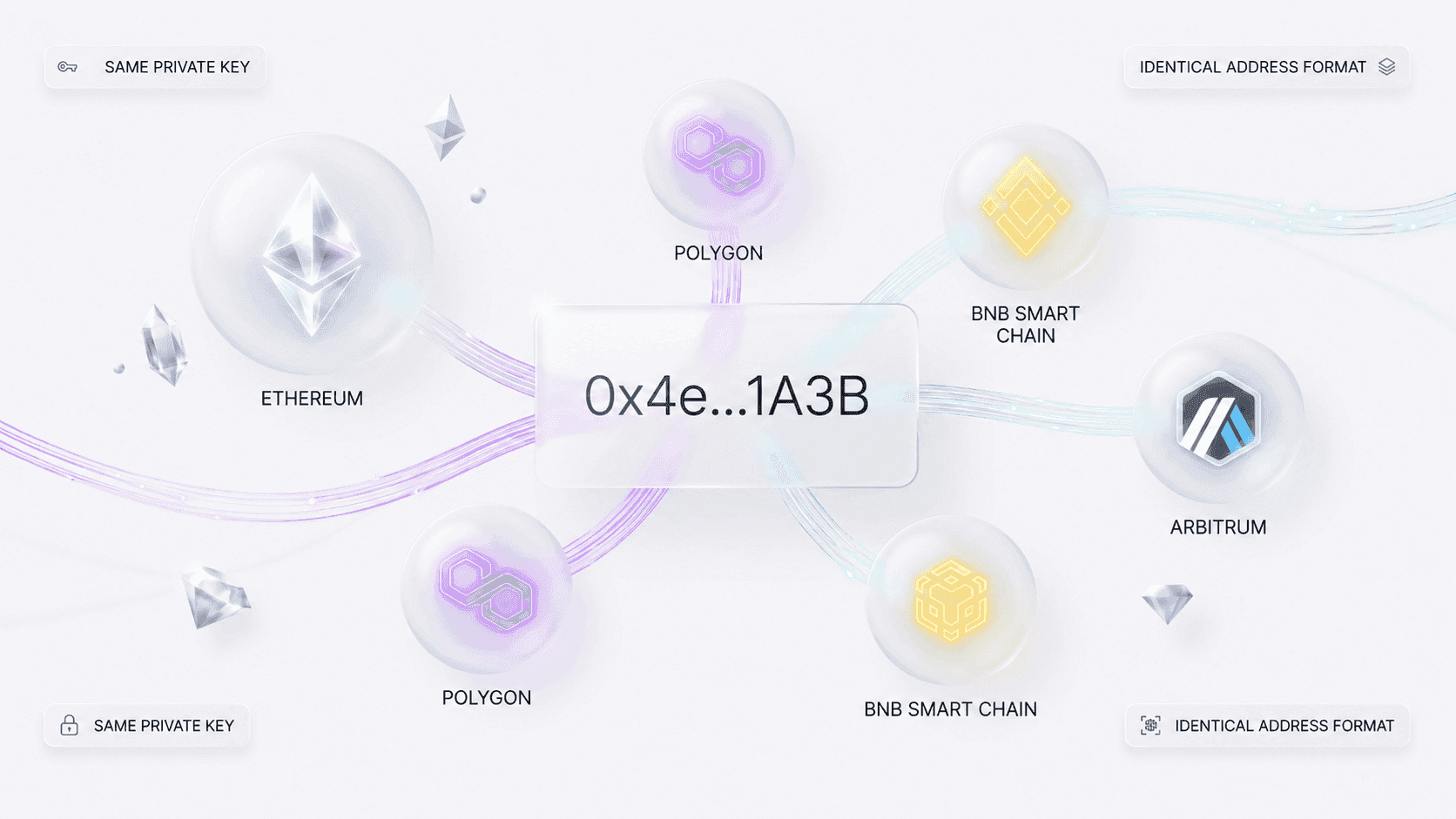
An EVM address works identically on all EVM‑compatible chains. This means your Ethereum address can receive funds on Polygon, BSC, Avalanche, and dozens of others — using the exact same string.
Why the same address works across EVM networks: All EVM networks use the same address derivation algorithm (based on the private key). The address is simply a representation of your public key. Each network maintains its own state, but the address format is identical.
- The private key is the secret key that controls your wallet — never share it.
- The seed phrase is a 12–24 word backup that can restore your entire wallet.
- The wallet address is the public string you share to receive funds — safe to share.
How to Add and Switch Between EVM Networks?
Most wallets come pre‑configured with Ethereum mainnet. To add other EVM networks, you need to enter a few details.
What you need to add an EVM network: network name (e.g., Polygon Mainnet), RPC URL (the endpoint to connect to the blockchain), Chain ID (a unique numeric identifier), currency symbol (e.g., POL), and optionally a block explorer for viewing transactions.
How to add EVM network to Trust Wallet: Open Trust Wallet, tap the network selector (or go to Settings > Networks), tap "Add Network" or "Custom RPC," enter the network details, and Save. Popular networks are often pre‑configured — you may only need to enable them.
How to add an EVM network in MetaMask: Click the network dropdown and select "Add network," choose from the list of popular networks or click "Add a network manually," enter the RPC URL, Chain ID, and currency symbol, and click Save.
How to switch between networks: In most wallets, you just click the network name (usually at the top of the interface) and select the desired chain. Always ensure you are on the correct network before sending funds — sending tokens to an address on the wrong network can result in loss of funds.
Sending Tokens Between EVM Networks and Gas Fees
You cannot simply send tokens directly from one EVM network to another. Each network maintains its own independent ledger. To move assets between EVM networks, you can use a bridge (like the official Polygon Bridge, Multichain, or Across), use a centralised exchange (deposit on one network, withdraw on another), or use a DeFi protocol that offers native cross‑chain swaps.
Why you can't send directly: The address is the same, but the networks are separate. Tokens on Ethereum are not accessible on Polygon unless they are bridged. Sending directly would result in the transaction failing or assets being lost.
Gas fees in EVM networks: Every EVM transaction costs gas, paid in the network's native token. Gas prices vary significantly between networks.
| Network | Approximate gas fee | Speed |
|---|---|---|
| Ethereum | Higher (often $1–$20+ / under normal conditions) | 12–15 seconds |
| Polygon | Very low (cents) | 2–3 seconds |
| BSC | Low ($0.10–$0.50) | 3–5 seconds |
| Arbitrum | Medium (varies) | 2 seconds |
| Avalanche | Low ($0.10–$0.30) | 2–3 seconds |
Always keep some native tokens in your wallet for gas fees — ETH on Ethereum, POL on Polygon, BNB on BSC.
EVM Wallet Risks and Security Best Practices
While EVM wallets are powerful, they come with risks. Protecting your assets is essential.
Common risks include phishing (fake websites impersonating wallets or dApps), fake wallet apps (malicious apps from unofficial sources), malicious dApps that trick you into signing harmful transactions, wallet drainers that empty your wallet if you sign a malicious transaction, and loss of seed phrase leading to permanent loss of access.
Security best practices: Never share your seed phrase or private key — no legitimate service will ask for them. Store your seed phrase offline on paper or metal. Download wallets only from official sources (e.g., metamask.io, trustwallet.com). Use hardware wallets for large amounts. Double‑check the network and address before sending. Revoke unnecessary dApp connections using tools like Revoke.cash.
Ethereum Virtual Machine PDF and Technical Documentation
For those who want to dive deeper, the Ethereum Virtual Machine PDF and official documentation provide comprehensive technical details.
Where to learn more: Ethereum.org (the official Ethereum documentation with a detailed EVM section), the Yellow Paper (the original technical specification of the EVM), Solidity docs (how smart contracts are compiled to EVM bytecode), and EVM deep dives (blogs and videos explaining the stack, memory, and storage).
An ethereum virtual machine pdf can be found on the official Ethereum website or through academic sources. The Yellow Paper remains the most authoritative technical reference.
Conclusion
An EVM wallet is your gateway to the Ethereum ecosystem and all its compatible networks. Understanding what EVM means in a wallet helps you use one address across dozens of networks, interact with DeFi and NFTs, and choose the right wallet for your needs.
EVM wallets are essential for anyone using crypto beyond simple transfers. They give you access to smart contracts, dApps, and the entire Web3 economy. Choose a secure EVM wallet — non‑custodial, reputable, and backed by a strong community — and always protect your seed phrase.
About This Article
This guide was prepared by the Crouton Digital team based on practical experience with EVM networks, wallets, and Web3 infrastructure.
Transparency Notice
Crouton Digital may have a commercial interest in some topics mentioned. Third-party wallets, networks, and services are referenced for informational purposes only and are not endorsed. Features, fees, and security practices may change, so verify details through official sources. This content is not financial, legal, investment, security, or technical advice. Cryptocurrency use involves risk, including permanent loss of assets if a private key or seed phrase is lost or exposed.
Frequently Asked Questions

A Web3 OG who has navigated the industry’s evolution from whitepapers to widespread adoption. Having built through the euphoria of bull runs and the discipline of bear winters. Opinions are strictly personal, crafted from years of deep-dive research and hands-on experience in the trenches.