

Add RPC to MetaMask – How to Connect Any Custom Network

RPC (Remote Procedure Call) is the communication bridge between your MetaMask wallet and a blockchain network. This metamask rpc setup requires five pieces of data: network name, RPC URL, chain ID, currency symbol, and optional block explorer URL. Always verify the node address and network ID from an official source before adding – using a malicious endpoint can expose your transaction data or lead to phishing attacks.
RPC Endpoint – What It Is and Why MetaMask Needs It
This connection point acts like a phone line between your wallet and a blockchain. When you send funds, check your balance, or use a decentralised application, your wallet communicates with a blockchain node through this address.
MetaMask – How Your Wallet Connects via RPC
Blockchains are decentralized networks of computers (nodes). Your wallet cannot store the entire blockchain – that would take terabytes. Instead, it sends requests to a node via a specific address. That node reads the current state (your balance, transaction history) and broadcasts your signed transactions to the network. For example, when you open your wallet and see your ETH balance, the wallet has just sent an eth_getBalance request to that node address. The node replies with a number, and the wallet converts it into a readable balance.
A malicious RPC can lie about your balance (e.g., show an inflated balance to encourage a larger transaction) or silently replace the recipient address in transaction simulation responses, leading to loss of funds.
How to Add and Change RPC URL in MetaMask
This section covers everything from when you need a custom network to real examples with BNB Chain, Base, and Polygon.
When You Need to Add a New RPC
You might need to add a new RPC in several situations:
- When using a dApp on BNB Chain, Polygon, Avalanche, or Arbitrum – these are separate networks, not Ethereum.
- When participating in a new Layer 2 (L2) testnet before it goes live.
- When connecting to a private blockchain for development or enterprise use.
- When switching to a faster or cheaper public RPC if the default one is slow or rate-limited.
Standard Network vs Custom Network – What's the Difference?
| Feature | Standard Network (e.g., Ethereum Mainnet) | Custom Network (e.g., a new L2) |
|---|---|---|
| Pre-added in MetaMask | Yes – appears automatically | No – you must add it manually |
| RPC URL | Hardcoded by MetaMask | You provide it |
| Chain ID | Known (1 for Ethereum) | Varies (e.g., 56 for BSC, 137 for Polygon) |
| Trust level | High (MetaMask vets the default endpoints) | Depends on your source |
| Updates | Automatic | You must update RPC URL if it changes |
Required Data for Adding a Network
To add any custom network successfully, you need five specific pieces of information. The most important is the node address – a web address like https://polygon-rpc.com or https://bsc-dataseed.bnbchain.org/. The five fields are: network name (a human-readable label), the node address, chain ID (a unique integer), currency symbol (the ticker for gas fees), and block explorer URL (optional, to view transactions). For example, for BNB Smart Chain you would enter network name "BNB Smart Chain", node address https://bsc-dataseed.bnbchain.org/, chain ID 56, symbol BNB, and explorer https://bscscan.com.
Step-by-Step: Add Custom RPC Manually
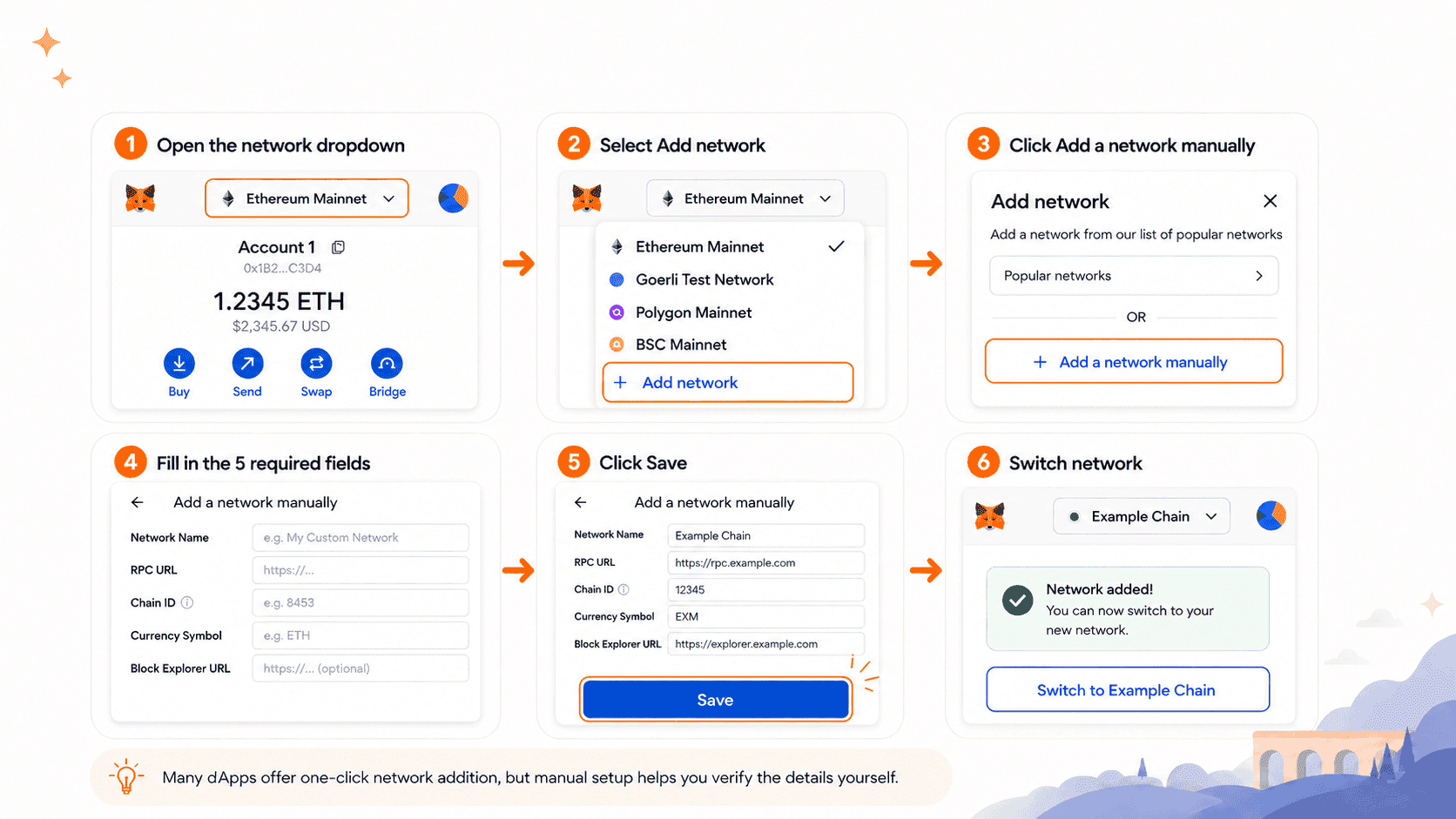
Follow these steps to add any EVM network. Open your wallet and click the network dropdown at the top (it likely says "Ethereum Mainnet"). Select "Add network" at the bottom of the list. Click "Add a network manually" (or "Add custom network" depending on version). Fill in the five fields from the table above. Click "Save". The wallet will ask if you want to switch to the new network – click "Switch network". Many dApps offer one-click network addition, but learning the manual method helps you verify everything yourself.
How to Change RPC URL for an Existing Network
If the node address you are currently using becomes slow or unreliable, you can change it without removing the network. Go to your wallet's Settings → Networks. Find the network you want to edit and click on it. Scroll to the address field and replace it with a new one (e.g., from a different free provider). Click "Save". Switch to that network and test a simple balance check. Changing this address does not change your wallet address or funds – you are just talking to a different node on the same blockchain.
Adding RPC in MetaMask App (Mobile)
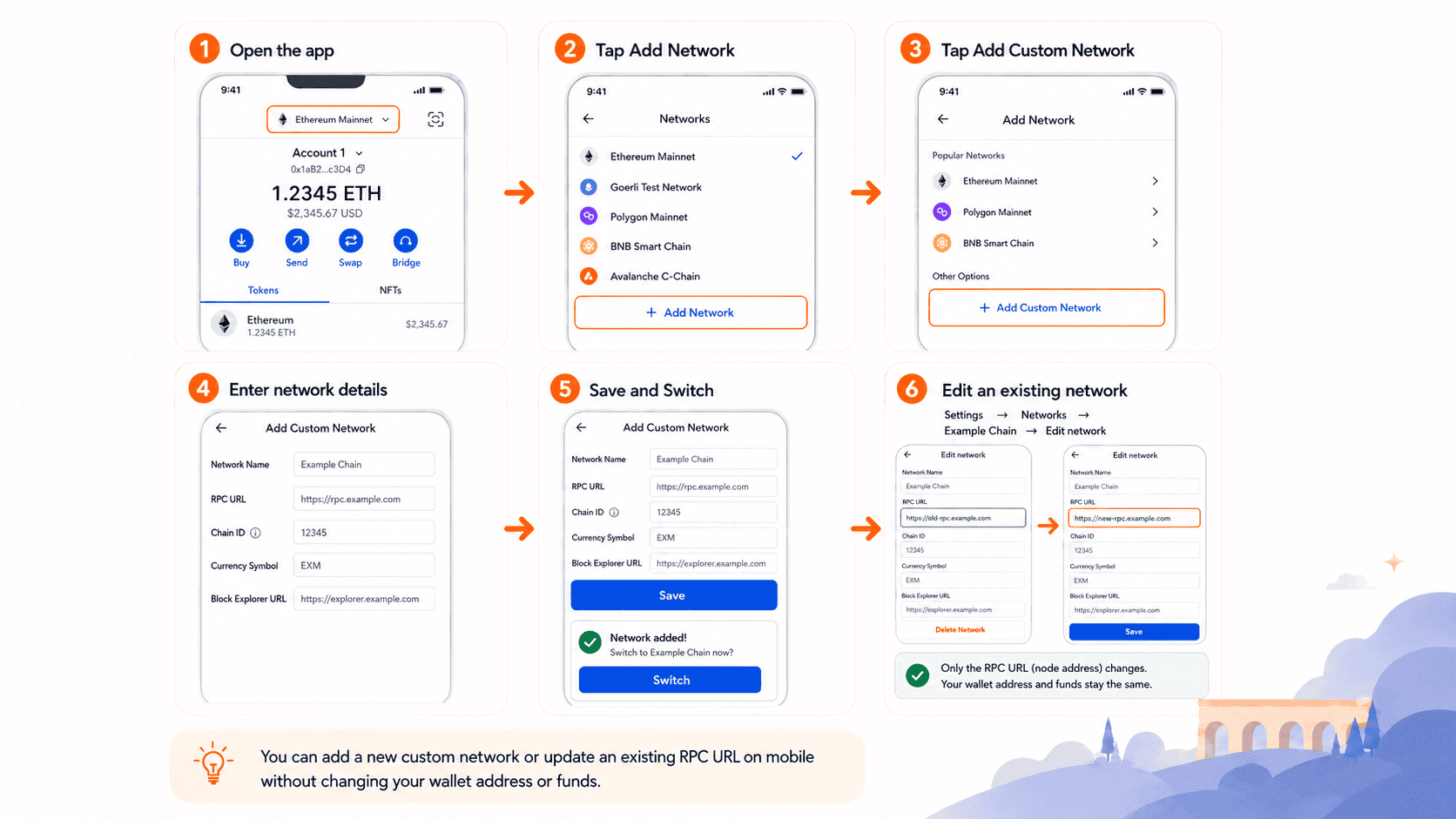
The iOS and Android version of the wallet supports custom networks just like the browser extension. To add a network on mobile, open the app and tap the network name at the top (usually "Ethereum Mainnet"). Scroll to the bottom and tap "Add Network". Tap "Add Custom Network". Enter the network name, node address, chain ID, symbol, and block explorer. Tap "Save" and then "Switch" to the new network. You can also change an existing network's node address on mobile: go to Settings → Networks → select the network → edit the address.
Examples with Real EVM Networks
To add BNB Chain, you need network name "BNB Smart Chain", RPC URL https://bsc-dataseed.bnbchain.org/, chain ID 56, symbol BNB, and block explorer https://bscscan.com. When you configure bsc rpc metamask, you must ensure the RPC URL points to a reliable public endpoint. Many users prefer https://bsc-dataseed1.binance.org/ as a backup.
Coinbase's Base network is an Ethereum L2. The correct parameters are network name "Base Mainnet", RPC URL https://mainnet.base.org, chain ID 8453, symbol ETH (Base uses ETH for gas), and block explorer https://basescan.org. The base public rpc from https://mainnet.base.org works well for most users, but heavy dApp users may want to use base mainnet public rpc url alternatives like https://base.llamarpc.com for redundancy. Additionally, you might encounter base rpc endpoint options from providers like Infura or Alchemy.
Polygon's most common public RPC is network name "Polygon Mainnet", RPC URL https://polygon.drpc.org/, chain ID 137, symbol POL, and block explorer https://polygonscan.com. For developers needing dedicated infrastructure, private rpc nodes from services like Infura or QuickNode offer higher throughput.
Private RPC Endpoints For Dapps – Security Best Practices
This section covers verification, risks, and safe removal of RPC endpoints.
Why Verify Chain ID and Official RPC URL Before Adding
Before clicking "Save" in your wallet, always go to the official website of the blockchain project (not a Google ad result). Find their "Network Configuration" or "For Developers" page. Compare the network ID – a wrong identifier could point to a fake network. Compare the node address – look for https and a domain name matching the project. For example, for Base network, the official documentation lists network ID 8453 and node address https://mainnet.base.org. A scam site might use the same network ID but a different address like https://base-scam-rpc.com.
Risks of Untrusted RPC Endpoints
Not all node addresses are safe. A malicious endpoint can lie about your balance – for example, show an inflated balance to encourage a larger transaction than you intended. It can silently replace the recipient address in transaction simulation responses, refuse to broadcast your transaction (censorship), or log your IP and wallet addresses (privacy loss). Critical rule: never add a node address from an untrusted source (random Telegram message, unofficial Discord, or a scam website pretending to be a blockchain explorer). Always cross-check with the project's official documentation or GitHub.
How to Safely Remove or Replace an RPC URL
If you suspect an added network is unsafe, go to Settings → Networks → select the suspicious network. Click "Delete" (browser) or "Remove" (mobile). Alternatively, change the endpoint address to a known safe free option before deleting. To replace a slow free endpoint with a faster dedicated one, edit the network and update only the address field. Do not change the chain ID or currency symbol.
Diagnostics, Performance, and Common Errors
This final section helps you troubleshoot and choose the right RPC type.
Public RPC – Free but Limited
A free shared endpoint requires no registration and works well for occasional transactions and learning. However, it has disadvantages: rate limits (e.g., 100 requests per minute), slower speeds during peak hours, and privacy concerns – the node operator can see your IP and all requests (not your private keys, but transaction patterns). If you are a casual user sending one transaction per hour, a free shared endpoint is fine.
Private RPC – Enhanced Performance and Stability
A dedicated service is reserved for your use only – often through an API key. You pay a subscription or usage fee, and in return you get higher rate limits, faster speeds, and better reliability. Dedicated infrastructure becomes essential when:
- Your application serves thousands of daily users (free endpoints will throttle you).
- You need real-time event listening via WebSockets without interruptions.
- You are running a trading bot that requires millisecond latency.
- You want to avoid exposing user IPs to public node operators for compliance reasons.
Why Reliable RPC Matters for Speed, Stability, and Security
A lagging or overloaded public endpoint can cause failed transactions (nonce mismatch), delayed balance updates, or incorrect price feeds in DeFi dashboards. This is why professional Web3 users often upgrade to a paid dedicated endpoint from providers like Infura, Alchemy, or their own node. Over time, a stable connection saves you money on failed transactions and reduces frustration.
Common Errors When Adding RPC and How to Fix Them
- Error: "This URL is not a valid RPC endpoint" – Make sure the URL starts with http:// or https:// and has no typos. Remove trailing spaces.
- Error: "Chain ID mismatch" – Double-check the chain ID from the official source. Common wrong IDs include using Ethereum's 1 for Polygon (should be 137).
- Network shows but transactions fail – The RPC URL may be down or rate-limited. Try a backup public RPC.
- "Invalid parameters" on mobile – Clear the form and re-enter data; sometimes a cached field causes issues.
Conclusion
Adding a custom network connection to your wallet opens the door to hundreds of compatible blockchains beyond the default mainnet. You now understand that an endpoint is not a wallet or a token – it is simply a communication channel between your software and a blockchain node. The key takeaways are: always verify the chain ID and the server address from official sources before adding a network; free access points are available but slower and less private, while dedicated paid services offer performance and reliability for professionals; you can add, edit, or remove these addresses in both the browser extension and the mobile app; if a network doesn't connect, try a different server address – the problem is rarely your wallet, usually the node. By mastering this configuration, you become a more self-sufficient Web3 user, able to access any network and troubleshoot connectivity issues on your own.
Frequently Asked Questions

A Web3 OG who has navigated the industry’s evolution from whitepapers to widespread adoption. Having built through the euphoria of bull runs and the discipline of bear winters. Opinions are strictly personal, crafted from years of deep-dive research and hands-on experience in the trenches.